Pulse Oximetry1.19.1
Publisher Description
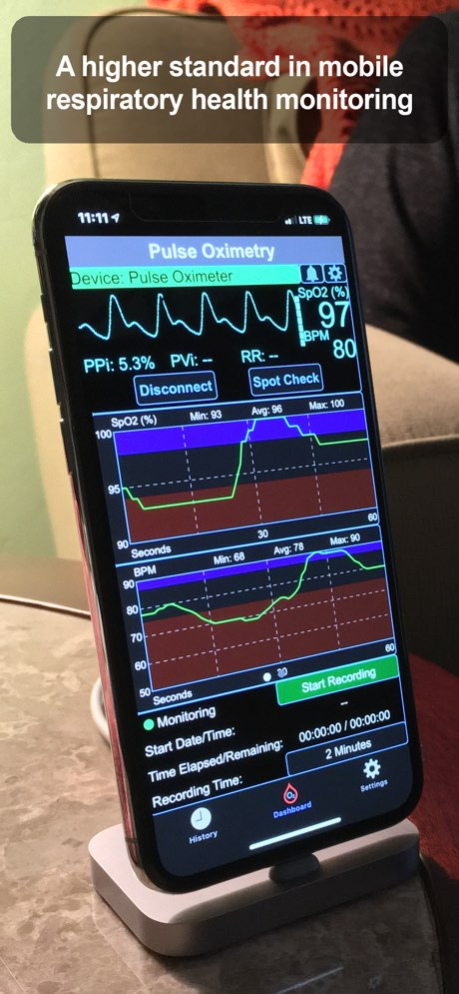
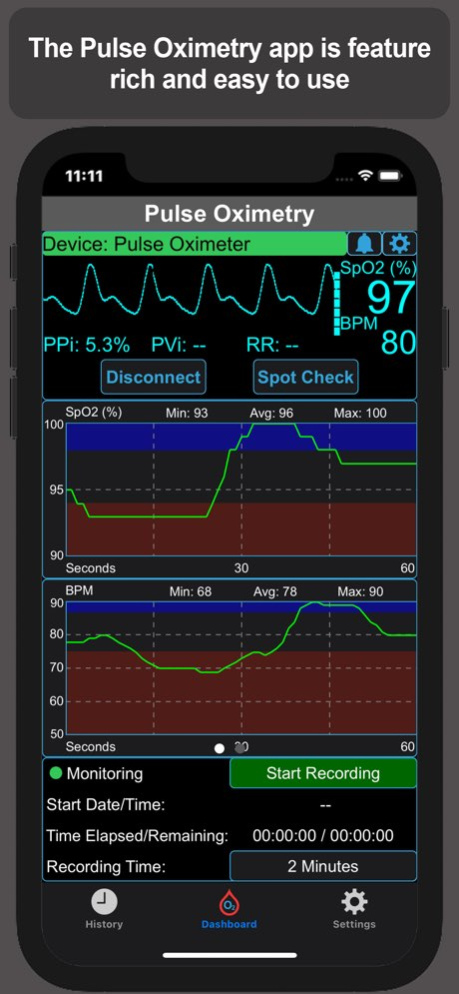
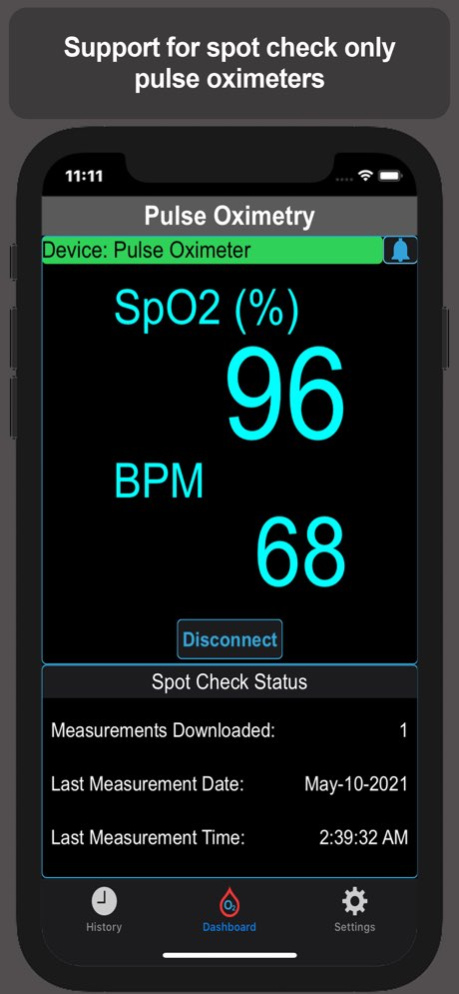
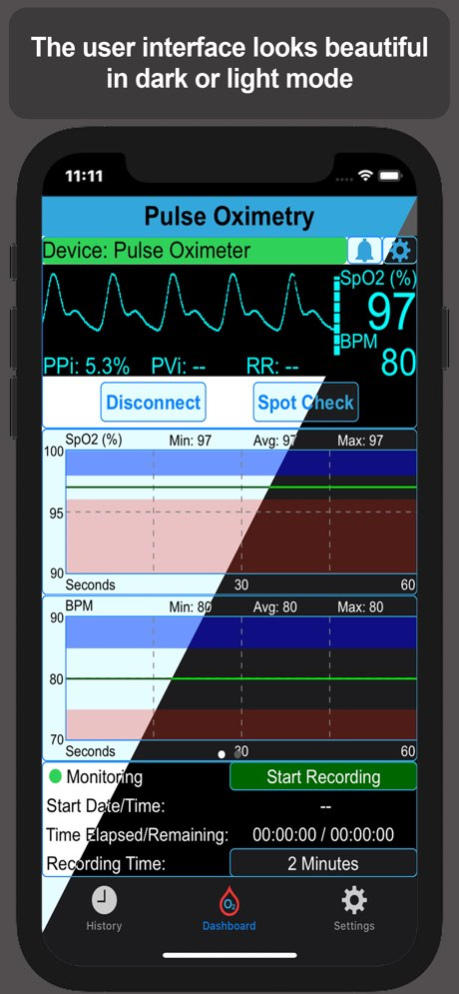
The Pulse Oximetry app lets you take control of your respiratory health with a feature-packed yet beautifully simple tool designed to help you track, monitor, and understand your breathing and oxygen levels. Best of all, you don’t need to sign up for an account or pay for a subscription. Just connect your Bluetooth pulse oximeter[1] and start gaining insights right away.
Important Information
- A Bluetooth pulse oximeter (sold separately) is required. The app works seamlessly with many of the most popular devices on the market. See the complete list at: www.appinlights.com/pulseoximetry/
- This app is not certified or approved by any regulatory agency and shall not be used for medical diagnosis. It is intended for educational, instructional, and research purposes only.
- Alarm conditions generated by the app shall not be considered medical emergencies, but should always be reviewed to ensure user safety.
- The Pulse Oximetry app never collects personally identifiable information.
Why Choose the Pulse Oximetry App?
Whether you’re managing asthma, cystic fibrosis, or COPD (including chronic bronchitis and emphysema) or simply keeping a closer eye on your health, this app gives you the tools to make smarter decisions about your well-being. With the ongoing concerns of COVID-19, staying informed about your respiratory health has never been more important. This app helps you stay on top of your respiratory wellness by harnessing the data from your Bluetooth pulse oximeter[1] and turning it into powerful insights.
With easy-to-read visualizations and comprehensive review tools, you can track trends, spot changes, and better understand your respiratory health. Pulse Oximetry is built to work with over 50 supported devices[1] (with more added regularly). That means you can switch pulse oximeters without switching apps - and without losing your valuable history. Your entire health record stays with you, all in one powerful app. Plus, you can easily export your data to Apple Health[2] for seamless integration into your wellness routine.
Powerful Features Designed for You
- Monitor View: Real-time display of all key measurements in one clear, easy-to-read screen
- Advanced Graphs: Detailed line charts for every tracked parameter to spot trends at a glance
- Smart Alarms: Customizable alerts that go beyond simple tones, giving you peace of mind
- Flexible Recording: Capture sessions from 2 minutes to 10 hours, at 1-second intervals
- Personalization: Choose between light or dark mode, and set international date/time formats
- Apple Health Integration: Sync your recordings directly into Apple’s Health app[2]
- Detailed History: Review spot checks and long recordings with rich data insights
- Flag & Highlight: Mark important measurements for future reference
- Custom Date Ranges: Focus on exactly the data you care about most
The Pulse Oximetry app puts control back in your hands with an intuitive design, unmatched device compatibility, and powerful tools for tracking respiratory health. Whether you’re a patient, caregiver, or researcher, it’s everything you need in one place.
[1] The app requires a compatible Bluetooth pulse oximeter to perform measurements. Bluetooth pulse oximeters are sold separately. For a complete list of supported devices go to https://www.appinlights.com/pulseoximetry/supported-devices.html
[2] The app supports exporting SpO2, heart rate, perfusion index and respiratory rate to Apple’s Health app. Not all pulse oximeters measure perfusion index and respiratory rate. Please check your device's literature for supported parameters.
**Note: The app can be installed on 3rd Generation and newer iPads, but because the screens of these devices have a 4:3 aspect ratio, as opposed to a 16:9 aspect ratio of compatible devices, the app is not guaranteed to look or function correctly on iPads.
Version History Updates and bug fix. 1.19.1 09/10/2025 - Fixed an issue that caused the app the "freeze" when switching in and out of the settings tab.
- Updated the minimum deployment version to iOS 16. iOS 16 is now the minimum required version to run on an iPhone.
- Other bug fixes and updates. 1.19 08/06/2024 - Added support for Masimo MightySat Rx 9907 (European), MightySat Rx 9909 and MightySat Rx 9942.
- Added support for Masimo European versions: MightySat 9901-B, MightySat Rx 9807 and MightySat Rx 9907, No RR
- Fixed a Dashboard tab bug where the graph view X axis values would revert to seconds when switching tabs and back again.
- Fixed a history scatter plot view bug where swiping left or right would not update the Y axis to reflect the new range of values.
- Fixed other small bugs. 1.18.20210905 09/06/2021 - This version introduced measurement flags. Swipe right on a measurement line in the History tab to set/remove a flag. Check the Quick Guide for more information.
- Corrected grammatical errors in the Quick Guide.
- Bug fixes.
Important: This version now requires iOS 11.4.1 or higher. 1.15.20210723 07/24/2021 1.00.20210513 05/19/2021
About Pulse Oximetry
The company that develops Pulse Oximetry is Victor Galvez. The latest version released by its developer is 1.19.1.
To install Pulse Oximetry on your iOS device, just click the green Continue To App button above to start the installation process. The app is listed on our website since 2026-10-13 and was downloaded 2 times. We have already checked if the download link is safe, however for your own protection we recommend that you scan the downloaded app with your antivirus. Your antivirus may detect the Pulse Oximetry as malware if the download link is broken.
How to install Pulse Oximetry on your iOS device:
- Click on the Continue To App button on our website. This will redirect you to the App Store.
- Once the Pulse Oximetry is shown in the iTunes listing of your iOS device, you can start its download and installation. Tap on the GET button to the right of the app to start downloading it.
- If you are not logged-in the iOS appstore app, you'll be prompted for your your Apple ID and/or password.
- After Pulse Oximetry is downloaded, you'll see an INSTALL button to the right. Tap on it to start the actual installation of the iOS app.
- Once installation is finished you can tap on the OPEN button to start it. Its icon will also be added to your device home screen.
Program Details
System requirements
Download information
Pricing
Version History
version 1.19.1
posted on 2026-10-13
Version History Updates and bug fix. 1.19.1 09/10/2025 - Fixed an issue that caused the app the "freeze" when switching in and out of the settings tab.
- Updated the minimum deployment version to iOS 16. iOS 16 is now the minimum required version to run on an iPhone.
- Other bug fixes and updates. 1.19 08/06/2024 - Added support for Masimo MightySat Rx 9907 (European), MightySat Rx 9909 and MightySat Rx 9942.
- Added support for Masimo European versions: MightySat 9901-B, MightySat Rx 9807 and MightySat Rx 9907, No RR
- Fixed a Dashboard tab bug where the graph view X axis values would revert to seconds when switching tabs and back again.
- Fixed a history scatter plot view bug where swiping left or right would not update the Y axis to reflect the new range of values.
- Fixed other small bugs. 1.18.20210905 09/06/2021 - This version introduced measurement flags. Swipe right on a measurement line in the History tab to set/remove a flag. Check the Quick Guide for more information.
- Corrected grammatical errors in the Quick Guide.
- Bug fixes.
Important: This version now requires iOS 11.4.1 or higher. 1.15.20210723 07/24/2021 1.00.20210513 05/19/2021
version 1.19.1
posted on 2025-09-10
Sep 10, 2025
Version 1.19.1
Updates and bug fix.
version 1.19.1
posted on 2025-09-10
Updates and bug fix.
version 1.19
posted on 2024-08-06
Aug 6, 2024
Version 1.19
- Fixed an issue that caused the app the "freeze" when switching in and out of the settings tab.
- Updated the minimum deployment version to iOS 16. iOS 16 is now the minimum required version to run on an iPhone.
- Other bug fixes and updates.
version 1.18.20210905
posted on 2021-09-06
Sep 6, 2021 Version 1.18.20210905
- Added support for Masimo MightySat Rx 9907 (European), MightySat Rx 9909 and MightySat Rx 9942.
- Added support for Masimo European versions: MightySat 9901-B, MightySat Rx 9807 and MightySat Rx 9907, No RR
- Fixed a Dashboard tab bug where the graph view X axis values would revert to seconds when switching tabs and back again.
- Fixed a history scatter plot view bug where swiping left or right would not update the Y axis to reflect the new range of values.
- Fixed other small bugs.
